CamOverlay — Hardware Node

The Overlay
Node

A compact hardware unit that connects directly to your POS or cash counter and pushes live transaction data onto your IP camera — no server, no cloud, no internet required.

Get a Quote View Profiles
2026-05-18   09:14:32
REC
CAM-01 · TILL AREA
▶ Ready for Transaction
POS
Cash Counter
Slot Machine
SPEED:
4
Profiles
8
Filters/Profile

Simple Flow

Your device connects to the overlay node. The node filters and processes the data. Your camera shows it live.
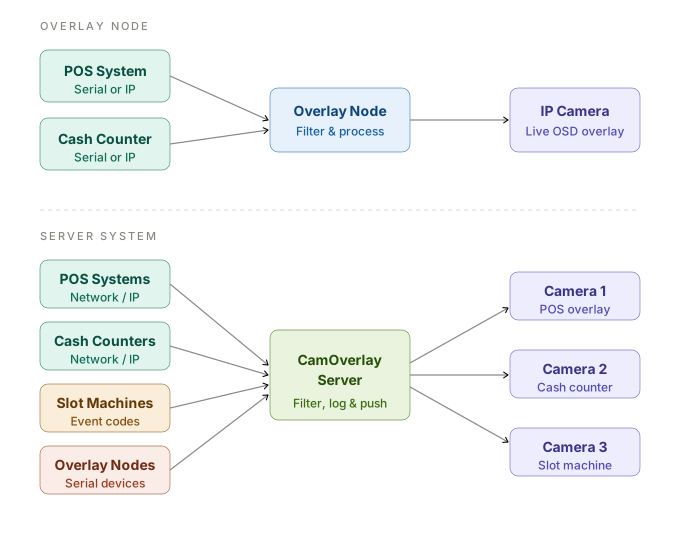
Flow diagram showing POS and Cash Counter connecting to Overlay Node which pushes to IP Camera

4 Device Profiles

Each profile has its own independent filter set. Switch between profiles from the management interface — no reinstallation required.

Serial POS
Reads serial output from a point of sale machine. Filters POS-specific prefixes like TOTAL:, CASHIER:, VOID:.
Serial / COM Port input
Serial Cash Counter
Dedicated profile for cash counter serial output. Shows denomination counts, totals, operator ID and verification status.
Serial / COM Port input
IP POS
Connects to POS device via TCP over the network. Reads the live data stream and applies the POS filter set. Auto-reconnects on disconnect.
TCP Network input
IP Cash Counter
Same TCP network approach as IP POS, with a dedicated cash counter filter set. Configurable reconnect interval.
TCP Network input

Everything Built In

The overlay node runs completely standalone. Configure it once from a browser on the same network — no software to install, no cloud account, no internet needed.

📷
Hikvision & Dahua
Pushes OSD text directly to the camera via the camera's native API. Works with your existing cameras — no DVR or NVR changes required.
Native Camera API
Scroll from Bottom
New transaction lines appear at the bottom of the 4-line OSD block and scroll upward. Configurable delay: 0.5s, 1s, 2s or 3s per line.
Configurable Speed
Per-Profile Filters
Up to 8 prefix filters per profile. Only matching lines (e.g. TOTAL:, CASHIER:, VOID:) reach the camera. Each profile's filters are completely independent.
8 Filters × 4 Profiles
Ready for Transaction
When idle between transactions a static "Ready for Transaction" message displays on the camera. Replaced immediately when the next transaction arrives.
Always-on display
📡
Central Server Reporting
Optionally sends each filtered line to the CamOverlay central server for logging, auditing and live monitoring across all nodes on site.
Optional Integration
🔒
Isolated Network Ready
Designed for camera networks with no internet access. Static IP, no cloud dependency. Production units use Ethernet only — fully air-gap friendly.
Air-gap Friendly

Get the Overlay Node

Supplied pre-configured for your site. Plug in, connect to the camera network, done.

✉ anthony@advancesolutions.co.za 📞 082 853 0885 💬 WhatsApp